Map Location Types
Use Map Location Types to classify locations by business purpose, such as:
- customer delivery point,
- vendor pickup point,
- company address,
- warehouse,
- hub,
- port,
- airport.
This helps keep newly created Map Locations consistent.
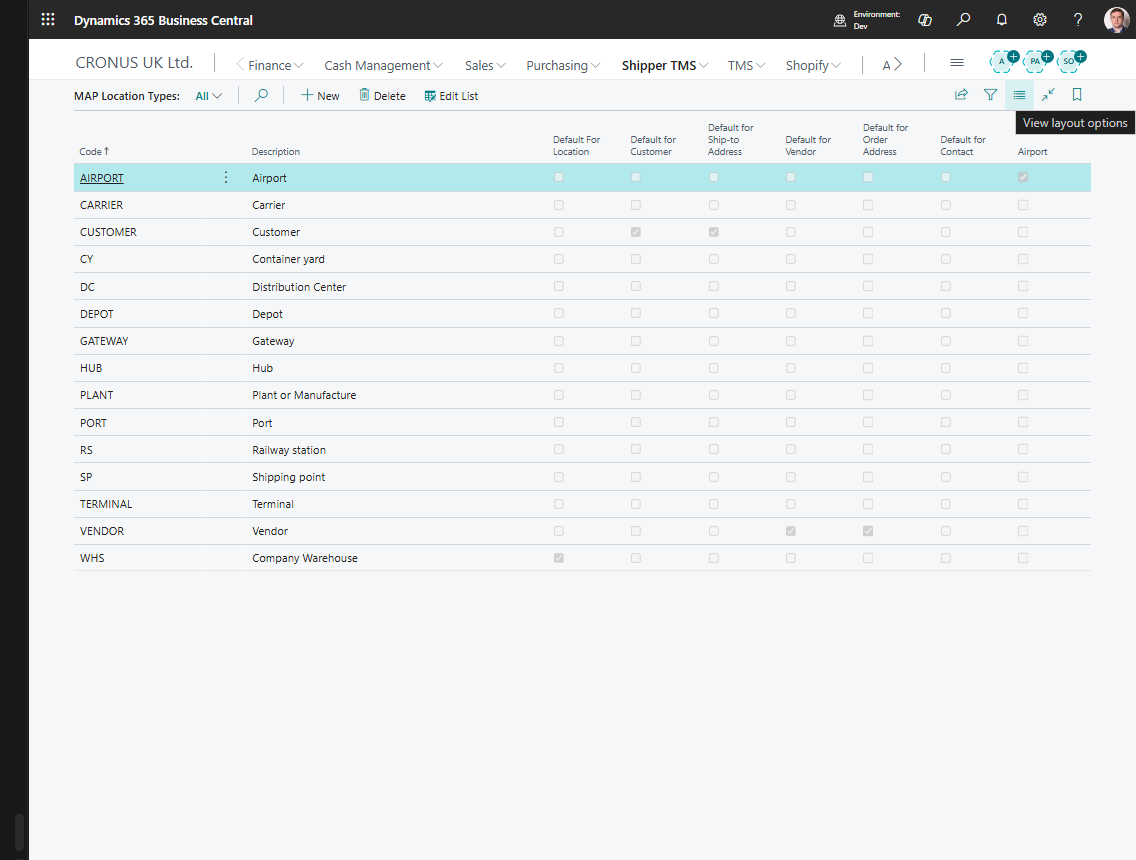
How to work in this page
Use this page when you need consistent defaults for new Map Locations.
- Create one type for each real category your planners use.
- Use readable codes such as
CUSTOMER,VENDOR,DEPOT,PORT, orAIRPORT. - Turn on a default flag only when new locations from that source should automatically receive this type.
- Do not turn on multiple defaults for the same source category unless you intentionally want the latest change to replace the previous default.
- Turn on Airport only for types that represent airports.
Create a location type
- Search for Map Location Types.
- Choose New.
- Fill in Code and Description.
- Turn on the default flag only for the entity types where this should be the default.
Default flags
Use the default flags carefully:
| Field | Meaning |
|---|---|
| Default for Customer | Used when a new Map Location is created from a customer |
| Default for Vendor | Used when a new Map Location is created from a vendor |
| Default For Location | Used when a new Map Location is created from a warehouse/location |
| Default for Ship-to Address | Used when created from a ship-to address |
| Default for Order Address | Used when created from an order address |
| Default for Contact | Used when created from a contact |
| Default for Company | Used when created from the company address |
Only one type should normally be the default for each source type.
Airport flag
Turn on Airport only for location types that represent airports. This enables airport-specific behavior in Map Location handling.