Map Locations
Use Map Locations to store the real geographic point used by transportation planning.
A Map Location can represent:
- a customer delivery point,
- a vendor pickup point,
- the company address,
- a warehouse,
- a depot,
- a port, hub, or airport,
- or any other stop used in transport.
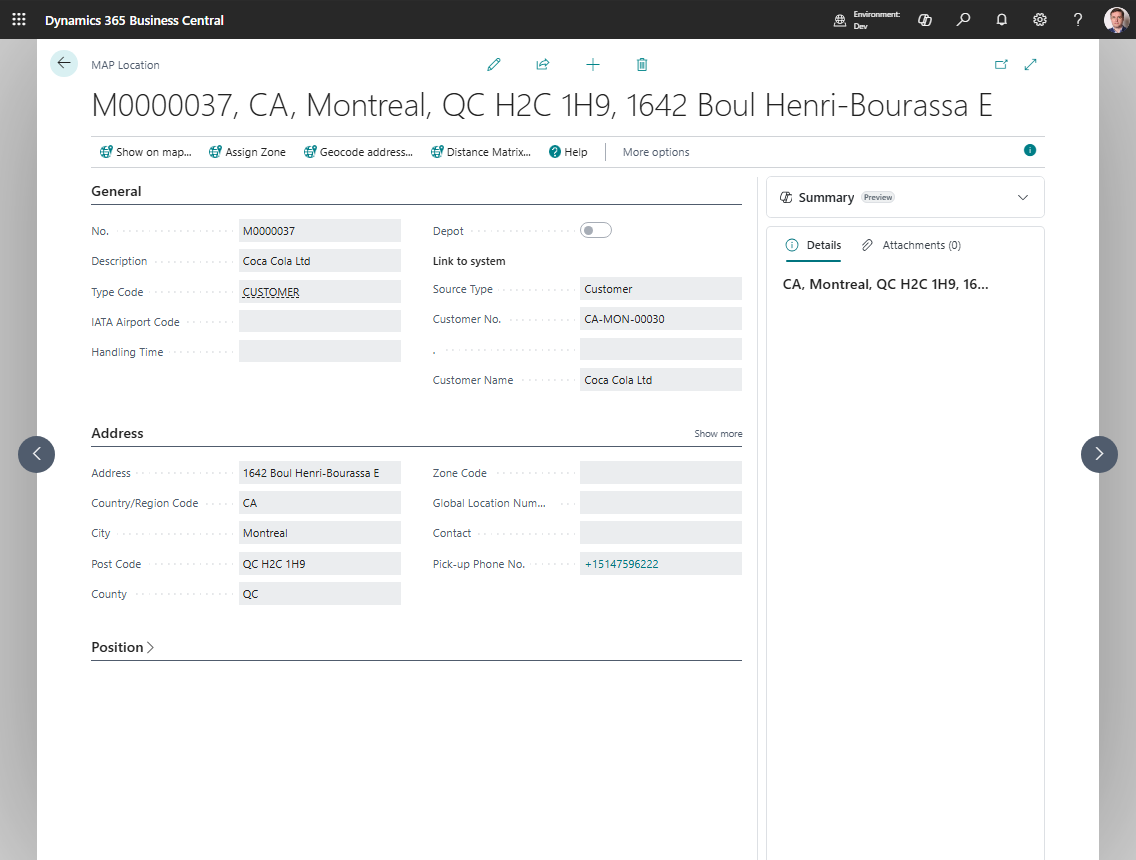
How to work in this page
Use the Map Location card to keep address, coordinates, and zone data correct.
- Fill Description and Type Code so planners understand what the point represents.
- If the location is linked to a customer, vendor, ship-to address, order address, location, company, or contact, fill the Link to system fields.
- Review the copied address and contact information.
- Choose Geocode address when the location has an address but no coordinates.
- Choose Show on map to review the map point.
- Choose Assign Zone when zones are configured and the point should be linked to a zone.
- Choose Distance Matrix when a manual distance or duration is needed for this point.
- If the map point is not exact, open the map and use the exact-place actions to move the marker.
Create a Map Location manually
- Search for Map Locations.
- Choose New.
- Fill in:
- Description
- Type Code
- address fields
- Choose Geocode address.
- Review the coordinates.
- If needed, choose Assign Zone.
Create a Map Location from an entity
You can also create a Map Location from:
- Customer
- Ship-to Address
- Vendor
- Order Address
- Location
- Company
- Contact
When you create the location from the source record, Shipper TMS fills the source link and copies the address values automatically.
Company Map Location
Create a Company Map Location when source document lines may not have a Business Central Location Code.
Use this setup when your company does not maintain warehouses on sales or purchase lines, but you still need a real geographic point for route display, distance, and duration.
- Open Map Locations.
- Create a Map Location for the company address.
- Set Source Type to Company.
- Geocode the address or set the coordinates manually.
- Open Company Information.
- Fill Default Map Location with that Company Map Location.
After this setup, Transport Requests created from lines without Location Code use the company Map Location as the company-side endpoint. This is a transportation planning point only. It does not create a Business Central location and does not make warehouse documents available for those blank-location lines.
Fine-tune the coordinates
If the geocoded point is close but not exact:
- Open the map viewer for the location.
- Choose Set the Exact Place.
- Move the marker to the correct point.
- Choose Save Exact Place.
- If needed, use Cancel Exact Place instead of saving.
Use zones with a Map Location
If your company uses Zones:
- Make sure the Map Location has coordinates.
- Choose Assign Zone.
- Review the proposed zone and save it.
This is useful when the stop should carry a zone or geofence reference instead of only raw coordinates.
When to use Distance Matrix
Use Distance Matrix when you need to store a manual distance or duration between two points, for example:
- port-to-port moves,
- locations where a provider route is not usable,
- company-specific planning exceptions.