Use case: Plan a delivery with an external carrier
Goal
Assign a carrier to a Transport Order and prepare the delivery for subcontracted execution.
When to use it
Use this flow when a third-party carrier executes the delivery and your company needs carrier selection, charges, or carrier documents.
Before you start
- Carrier master data exists and is not blocked.
- Carrier rates are configured if carrier comparison is used.
- Carrier rate type mapping is configured if automatic charge lines are required.
- The Transport Order is Open and has route stops.
Steps
- Open the Transport Order.
- Confirm route stops, distance, and dates.
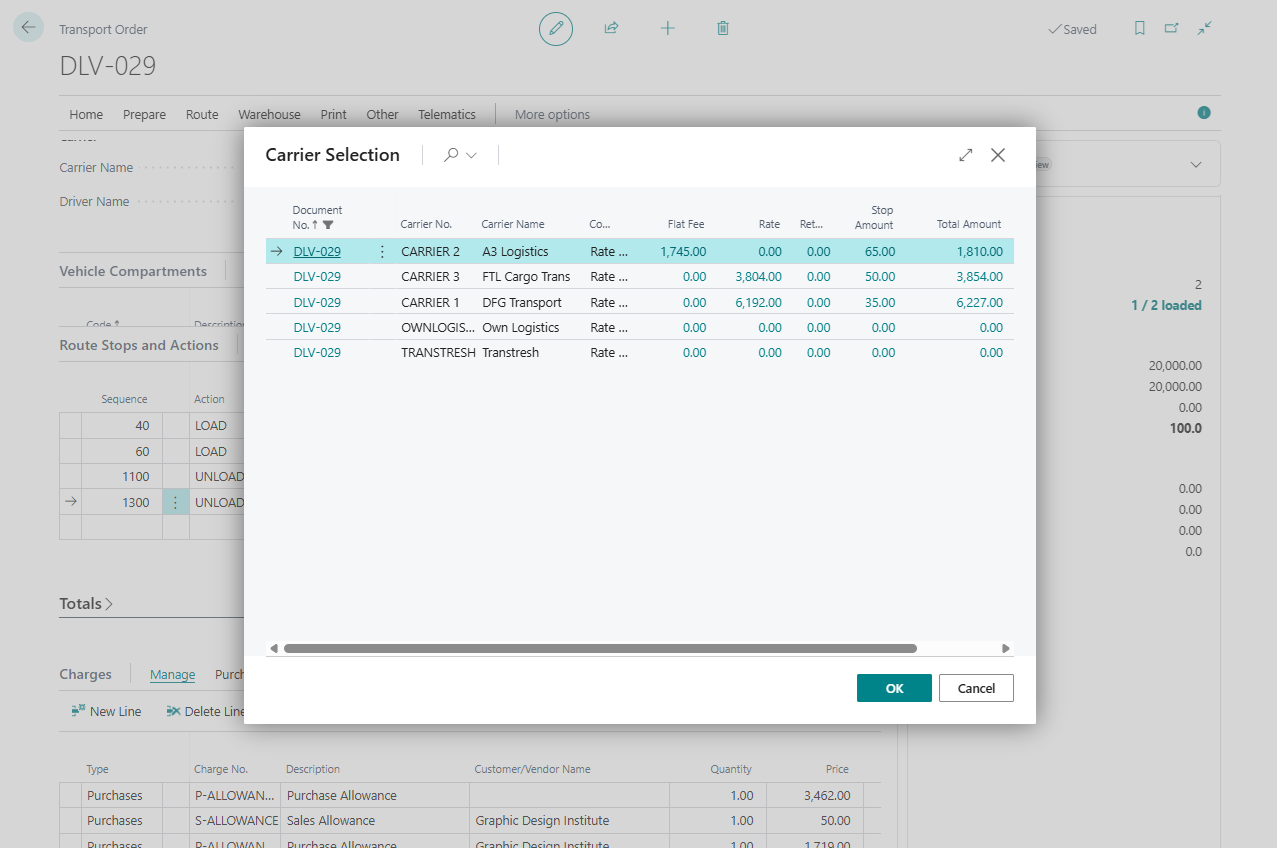
- Choose Carrier Selection.
- Review returned carriers and cost breakdown.
- Select the carrier to apply.
- Review automatically created charge lines if enabled.
- Allocate charges when required.
- Release the Transport Order.
Expected result
- Carrier fields are updated on the Transport Order.
- Charge lines are created when setup enables them.
- The order is ready for carrier execution, documents, telematics, or posting.
What to do next
Create warehouse documents if needed, print transport documents, or publish to telematics.
Common errors
| Problem | What to check |
|---|---|
| Carrier Selection is unavailable | Order status and Carrier Selection Enabled in TMS Setup |
| No carriers are returned | Carrier blocked status, matching rates, route stops, and geography filters |
| Charge mapping error appears | Carrier Rate Types Mapping and item charge setup |