Vehicle Compartments and Transportation Conditions
Use vehicle compartments and transportation conditions when one load can contain different cargo groups that must stay separated.
Common examples:
- frozen and ambient goods on the same truck,
- refrigerated and dry cargo,
- hazardous and non-hazardous goods,
- customer rules that require separate loading areas.

How the pieces work together
| Setup | What it controls |
|---|---|
| Transportation Condition | The cargo handling requirement, usually read from an item attribute |
| Logistic Unit Type | Capacity profile used for pallets, containers, vehicles, or compartments |
| Vehicle | The truck or equipment used in planning |
| Compartment | A separated capacity area on the vehicle |
| Truck Load Management candidates | The planner-facing result: eligible, warning, or blocked |
Before you start
Make sure that:
- item attributes identify the transportation condition used by Shipper TMS;
- items have the correct condition values;
- logistic unit types and vehicle capacity are maintained;
- vehicle compartments are configured if the truck can carry separated cargo;
- planners know which conditions can share a vehicle and which conditions must not be mixed.
Example: frozen and ambient delivery
A truck has two compartments:
| Compartment | Capacity | Condition |
|---|---|---|
| Front compartment | 8 pallets | Frozen |
| Rear compartment | 12 pallets | Ambient |
A planner has two released Transport Requests:
| Request | Cargo | Required condition | Planning result |
|---|---|---|---|
| TR-1001 | Ice cream | Frozen | Eligible for the frozen compartment |
| TR-1002 | Canned goods | Ambient | Eligible for the ambient compartment |
Both requests can travel on the same truck only when each request fits a compatible compartment and the compartment capacity is not exceeded.
How planners see the result
In Truck Load Management, candidate requests can appear as:
| Candidate result | Meaning |
|---|---|
| Eligible | The request fits the selected truck slot and compatible compartment capacity is available. |
| Warning | The request might fit, but the planner should review capacity, condition, time slot, route, or driver setup. |
| Blocked | The request cannot be added until the shown reason is fixed. A common reason is no compatible compartment or not enough capacity. |
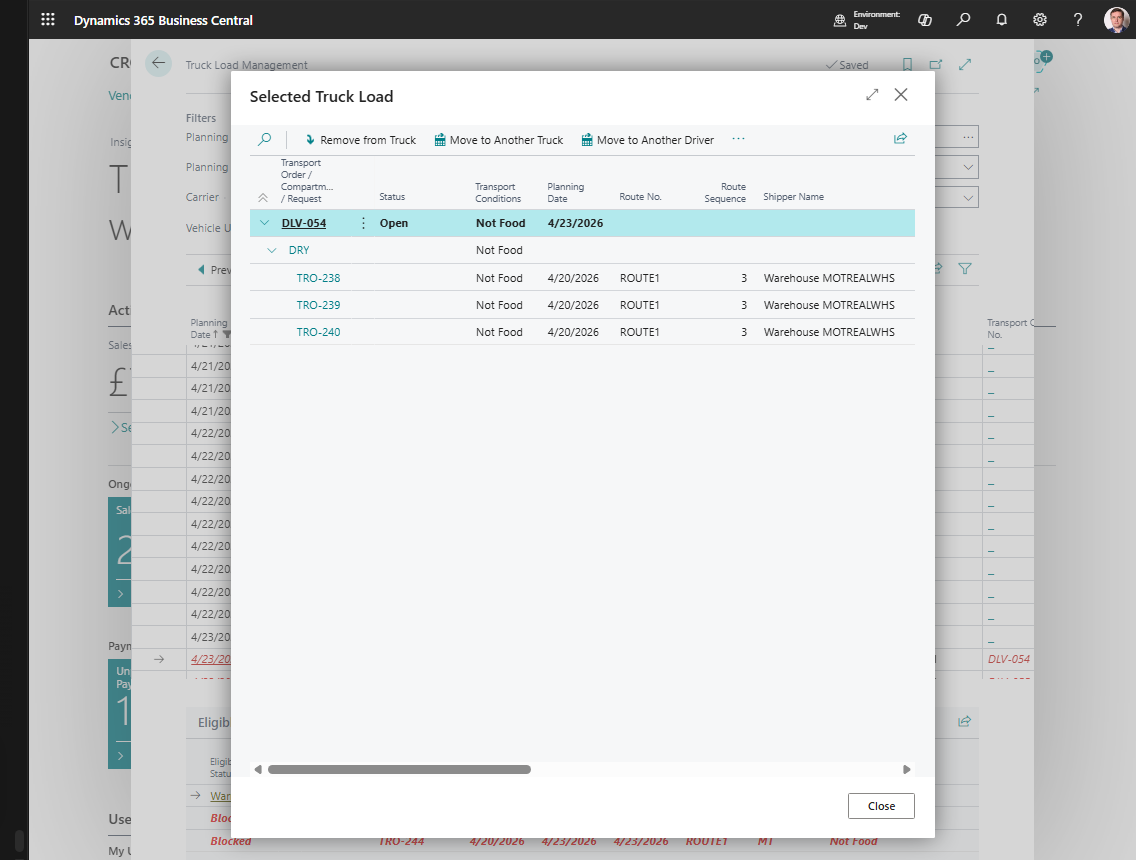
After assignment, Selected Truck Load shows the Transport Order, the matched compartment, and the Transport Requests placed under that compartment.
Good to know
- Transportation conditions help split source demand into safer planning units.
- Compartments help one vehicle carry separated cargo without mixing it in the same capacity area.
- Capacity rules are only as reliable as item, logistic unit, vehicle, and compartment setup.
- If a request appears blocked, switch candidate view to All With Reasons or Blocked Only and read the reason before changing setup.