Telematics Provider Mapping
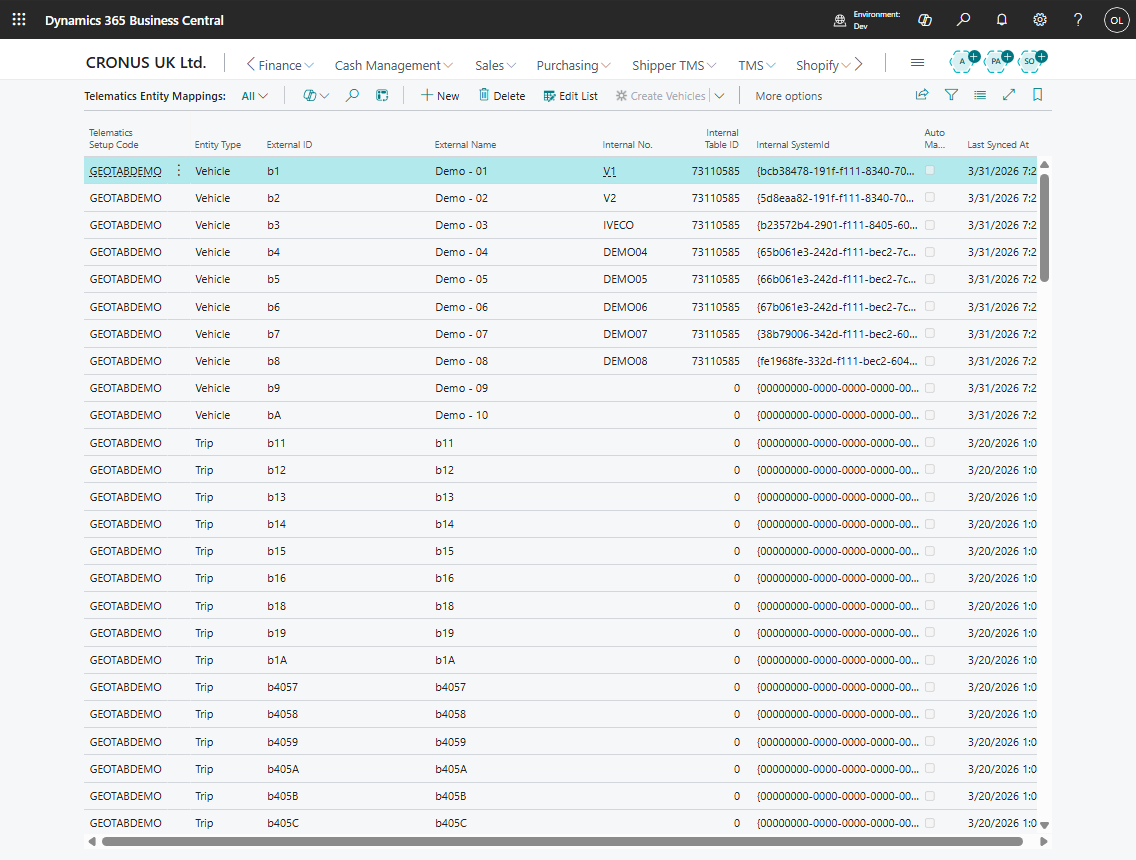
Use Telematics Entity Mapping to connect external provider IDs to Shipper TMS records.
Mapping keeps provider IDs out of the core transport records while still letting Shipper TMS publish and receive provider data.
Entities that can be mapped
| Provider entity | Internal Shipper TMS record |
|---|---|
| Vehicle | Vehicle |
| Driver | Driver |
| Zone or geofence | Zone |
| Map location or stop location | Map Location |
Mapping fields
| Field | Meaning |
|---|---|
| Telematics Setup Code | Provider setup this mapping belongs to |
| Entity Type | Vehicle, Driver, Zone, or Map Location |
| External ID | Provider-side record identifier |
| External Name | Provider-side display name |
| Internal No. | Shipper TMS record number |
| Internal Table ID and Internal SystemId | Internal binding when the mapping uses a system id |
| Auto Mapped | Mapping was created automatically by sync logic |
| Last Synced At | Last time provider data refreshed the mapping |
Map a vehicle or driver
- Sync vehicles and drivers from the provider.
- Open Telematics Entity Mapping.
- Filter by the telematics setup and entity type.
- Select the provider record.
- Fill the matching internal Vehicle or Driver.
- Save the mapping.
- Publish or refresh a test Transport Order to confirm the mapping works.
Important rules
| Rule | Why it matters |
|---|---|
| One internal record should not be mapped twice for the same provider setup and entity type | Duplicate mappings can publish to the wrong vehicle, driver, or zone |
| Keep blocked vehicles and drivers out of dispatch testing | A blocked internal record can prevent planning or dispatch |
| Review automatic mappings before go-live | Name-based matching can be useful, but users should confirm the result |