Use case: Create a Transport Request from a Sales Order
Scenario
You have a Sales Order that must be handed over to transportation planning.
Use this process for a normal outbound customer delivery when the whole remaining eligible quantity can become transport demand.
Before you start
- The Sales Order must contain eligible item lines.
- Item lines can have Location Code. If they do not, Company Information must have a Default Map Location.
- For an unposted Sales Order card, the document must be Released before Create Transport Request is available.
- TMS Setup must have Transport Request Nos. filled.
- Customer, ship-to, location, and company address data should be complete for the endpoints you use.
- Map locations should be configured if the planner needs distance, duration, or route display.
Steps
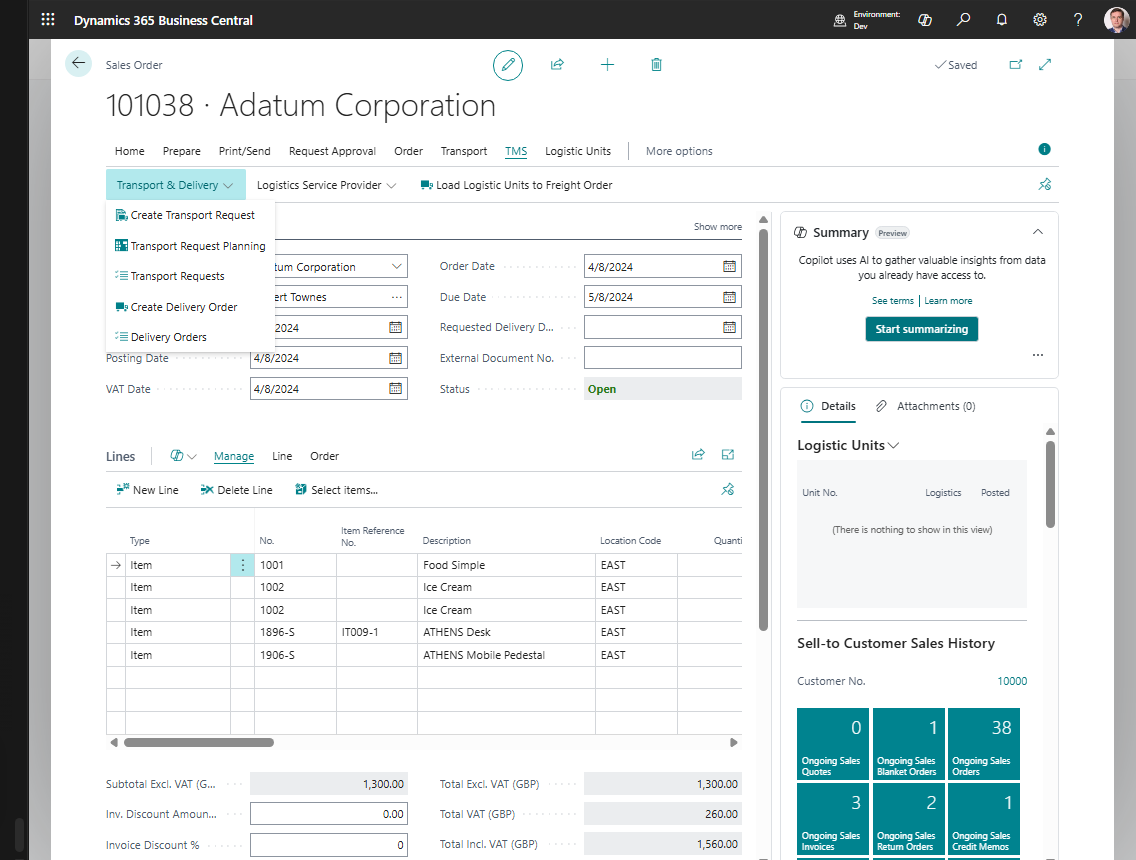
- Open Sales Order.
- Create or review the item lines that need transportation.
- Verify that each relevant line has either Location Code or that Company Information has a Default Map Location.
- Release the Sales Order. The Create Transport Request action becomes available if eligible quantities remain.
- Open the Shipper TMS action group.
- Choose Create Transport Request.
- Confirm the prompts shown by the system.
- Open the created request if you want to review it immediately.
- Review shipper, consignee, load date/time, unload date/time, route, and request lines.
- If the request is still Open, choose Release when it is ready for planning.
Result
Shipper TMS creates a Transport Request for the remaining eligible lines of the Sales Order. The request stays linked to the source document.
The request is ready for planning when its status is Released. You can then assign it to a Transport Order from the request, from the Transport Requests list, or from a planning worksheet.
What to do next
Choose one of these paths:
| Need | Next step |
|---|---|
| Add the request to a new trip immediately | Open Transport Requests, select the request, and choose Create New Transport Order. |
| Combine this request with other demand | Use Transport Request Load Planning or Visual Scheduler. |
| Plan by own-fleet truck slot | Use Truck Load Management. |
| Select an external carrier later | Create or open the Transport Order, then use Carrier Selection. |
Troubleshooting
| Problem | What to check |
|---|---|
| Create Transport Request is unavailable | The Sales Order must be Released and must contain remaining eligible quantities. |
| No request is created | Check item lines, remaining quantities, endpoint setup, and whether the quantities were already assigned to another Transport Request. |
| A line without Location Code fails | Company Information default Map Location. |
| A drop shipment line fails | The Sales Line must be linked to the related Purchase Order line. |
| The request cannot be released | Fill Load Date And Time and Unload Date And Time on the Transport Request. |
| The route is incomplete | Check customer, ship-to, location, company, and map location setup. |